
Visits Analytics provides a consistent way to analyse Visits performance across Locations, Brands, and Markets in Almanac.
Visits Analytics is available in three places:
- Location section ➡️ Location Visits tab
- Brand section ➡️ Brand Visits tab
- Market section ➡️ Market Visits tab
Each Visits tab follows the same structure:
- Metric Cards at the top, showing headline Visits KPIs
- A time series graph underneath, visualising Visits metrics over time
How the Visits Tab Is Structured
Across Locations, Brands, and Marketsviews, the Visits tab presents the same data in two complementary ways.
Metric Cards
Metric Cards provide an at-a-glance snapshot of Visits performance for the current context.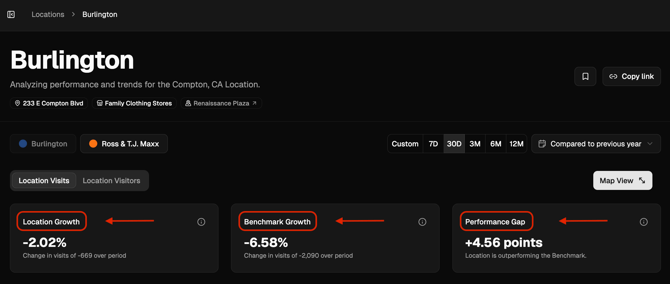
By default, the cards display growth-based metrics:
- Entity growth: Growth of the Location, Brand, or Market being analysed
- Benchmark growth: Growth of the selected comparison set
- Performance gap: The difference between the two, shown in percentile points
All Metric Cards stay in sync with the selected date range, comparison period, time aggregation, and any applied benchmark or comparison set.
If the user clears the time comparison (by selecting Clear comparison from the comparison dropdown), the Metric Cards switch to showing absolute values instead of growth.
Visits Time Series
Directly beneath the Metric Cards, the time series graph plots Visits over time for the same entity.
Within the chart, users can:
- Toggle between Total Visits and Growth
- Switch between Line graph and Bar chart visualisations
- Change the time unit (day, week, month, quarter)
- Export the data as a CSV
These chart controls do not affect the Metric Cards, allowing users to explore trends without changing headline KPIs.
Location Visits
Where: Location section ➡️ Location Visits tab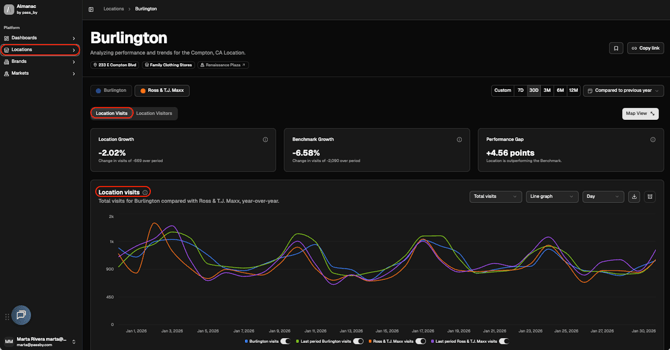
This view focuses on Visits performance for a single location.
- Metric Cards summarise Visits growth for the selected location and benchmark
- The time series graph shows how that location’s Visits change over time
Both components update together when dates, comparison period, aggregation, or benchmark selection change.
Brand Visits
Where: Brand section ➡️ Brand Visits tab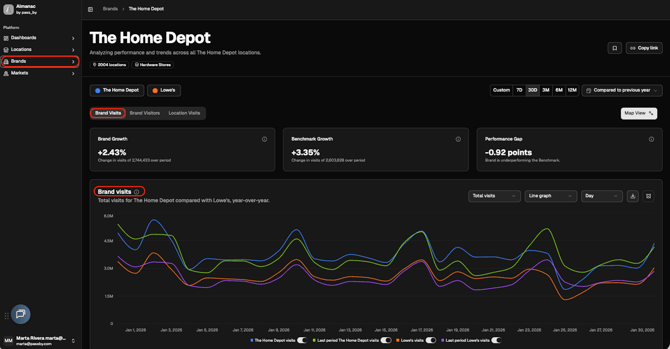
This view provides a Visits-focused summary across a brand’s locations.
- Metric Cards show brand-level Visits growth, benchmark growth, and performance gaps
- The time series graph visualises brand Visits trends over the selected period
The same controls and behaviour apply as in Location Visits.
Market Visits
Where: Market section ➡️ Market Visits tab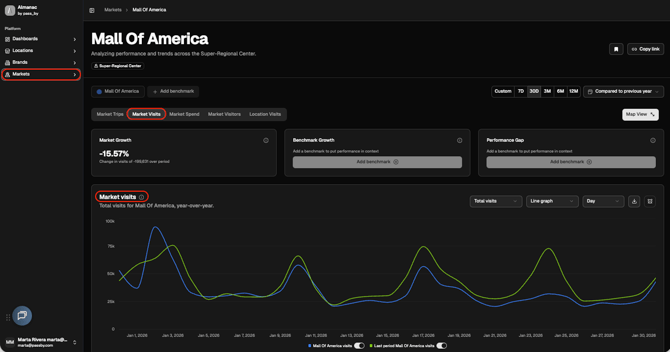
This view analyses Visits across an entire market or area.
- Metric Cards summarise market-level Visits growth and benchmark comparisons
- The time series graph shows how Visits evolve across the market over time
Data Freshness
A clock icon indicates how fresh the data is for the current view. Typical data latency is 4–5 days
Why This Matters
Visits Analytics provides a clear, repeatable way to understand performance.
- Metric Cards answer “How are Visits performing right now?”
- The time series answers “How has that Visits performance changed over time?”
Together, they give users both immediate context and historical insight using the same data and assumptions.