![logo-2 (1)-Oct-10-2023-11-05-48-5121-AM.png]](https://help.passby.com/hs-fs/hubfs/logo-2%20(1)-Oct-10-2023-11-05-48-5121-AM.png?height=50&name=logo-2%20(1)-Oct-10-2023-11-05-48-5121-AM.png)
Note:
The Places section now uses the 2.0 navigation layout, aligning with the Dashboard and other key areas of Almanac. This unified experience is being rolled out across the platform.
Overview
The Places section in Almanac is where you analyze performance at the store level. From traffic patterns to visitor demographics and trade area maps, this view gives you rich, location-specific insights that help explain internal performance in context with the surrounding market.
Getting to the Places Section
You can enter the Places section in a few ways:
- Click a store name in the Dashboard, Chains, or other views
- Use a shared link from a teammate
- Manually search using the map interface
How to Search for a Place
- Enter a location in the map’s search bar
- Adjust the radius (1, 3, or 5 miles) to find stores nearby
- Use the filters to narrow by store type
- Use the sort menu to change the order of results
- Click on a store from the list on the left panel
- A map card appears—click "Analyze place" to enter the full analytics view
Layout Overview
Once you’re inside the Places view, here’s how the layout is structured:
- Map View + Map Card
Shows the selected store's location and summary information (name, address, industry category) - Header Menu
Located directly below the map, this includes:- Store name
- Any comparisons you’ve added
- Controls to adjust date range, copy a link, and create a report
- Analytics Tabs
Below the header are three main sections of data:- Store visits data
- Store visitors data
- Trade area data
Store Visits Data
This tab includes:
- Benchmark metrics cards
- Place Growth: % change in visits to this location (e.g., year-on-year)
- Benchmark Growth: Similar data for the comparison you’ve selected
- Performance Gap: Difference between the two
- Store visits chart
- Toggle between bar or line charts
- Change aggregation: daily, weekly, monthly, or quarterly
- Hover to view exact values
- Use the Export menu to download the data as a CSV
Store Visitors Data
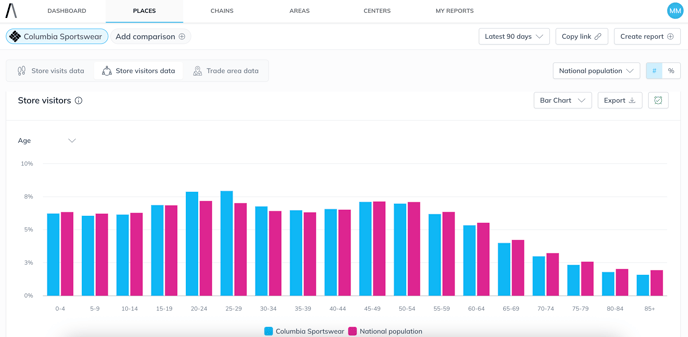
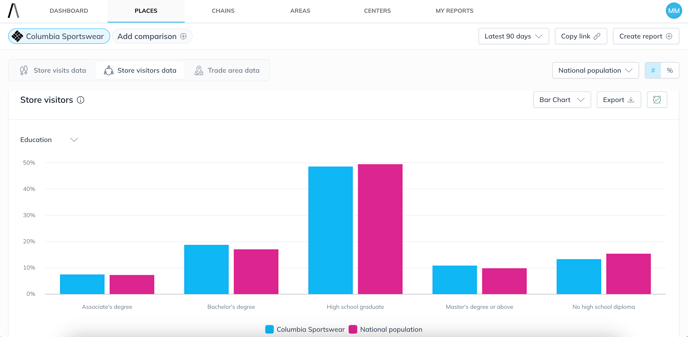
This section reveals demographic traits of store visitors (e.g., age breakdown).
- Data is aggregated monthly, and date ranges are approximated to the closest available month
- Use dropdowns to filter traits and switch between visualizations
- Exports are available as CSV or image
Trade Area Data
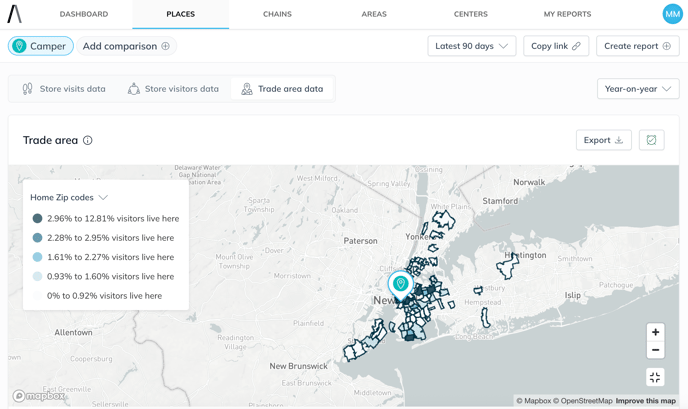
Explore where your visitors live, with insights down to:
- Core trade areas
- Zip codes
- Census block groups
Trade area data is based on the latest available quarter (e.g., Q1 2025)
Exports are available for offline analysis
Conclusion
The Places section equips you with a comprehensive view of store performance. With side-by-side comparisons, rich visitor data, and dynamic trade area mapping, it’s an essential tool for turning foot traffic data into meaningful business decisions.